The part of woodworking I love is the shop. Milling rough boards flat, cutting a joint that closes up tight on the first try, putting the first coat of oil on walnut. The part I don't love is everything that has to happen at a desk before any of that. Every project I have built started as a plan, and for years the plan has lived in a black and white composition book.
I tried to do it properly. I spent real time with SketchUp, and plenty of woodworkers are fast and happy in it. I never got there. Every session felt like I was fighting the tool to draw a box, and by the time I had a model I liked I had lost the energy to build the thing. So I kept going back to the notebook: a sketch, some dimensions in the margin, a cut list that got crossed out and rewritten as the design changed.
What the notebook
cost me.
The notebook is cheap and always within reach, and it worked well enough that I didn't question it for a long time. But it has real costs, and they show up in the shop, where mistakes are expensive.
- 01Errors. A dimension changes on one page and not on another. A rail gets a new thickness but the slot it drops into doesn't. I find out when the parts don't go together, and sometimes that means milling and cutting a part a second time.
- 02Wasted material. Laying out parts on a sheet of plywood with a pencil and a calculator is slow, so I rarely did it carefully. I would buy an extra sheet to be safe, or find out halfway through that I needed one.
- 03Hard to see. A pencil sketch shows me the outside of a piece. It doesn't show me how a corner goes together, which part goes in first, or whether a bolt will run into a joint I already cut.
None of those problems is about woodworking skill. They are all about keeping a lot of numbers consistent and being able to see the thing before it exists. That is work a computer should be doing.
So I built
a skill.
I spend my working days building things with Claude, so this weekend I wrote a Claude skill for woodworking plans, called woodworking-plans. A skill is a packaged set of instructions, references and scripts that Claude loads when a task calls for it. This one knows how to take a project from an idea to a plan I can build from.
Using it is just a conversation. I describe what I want: a queen bed, a side table, a bank of shop drawers. I can hand it reference images or photos of pieces I like. I can tell it the joinery and fasteners I want, and it treats that as a requirement. Or I can leave the joinery open and let Claude recommend something, with its reasons. It asks me once for what it can't work out on its own, like the governing size, the wood, and whether the piece has to come apart for moving.
What comes back is a single page that looks like the drawings supplement in a woodworking magazine. The first thing on it is a 3D model I can spin around, zoom into and switch between preset views.
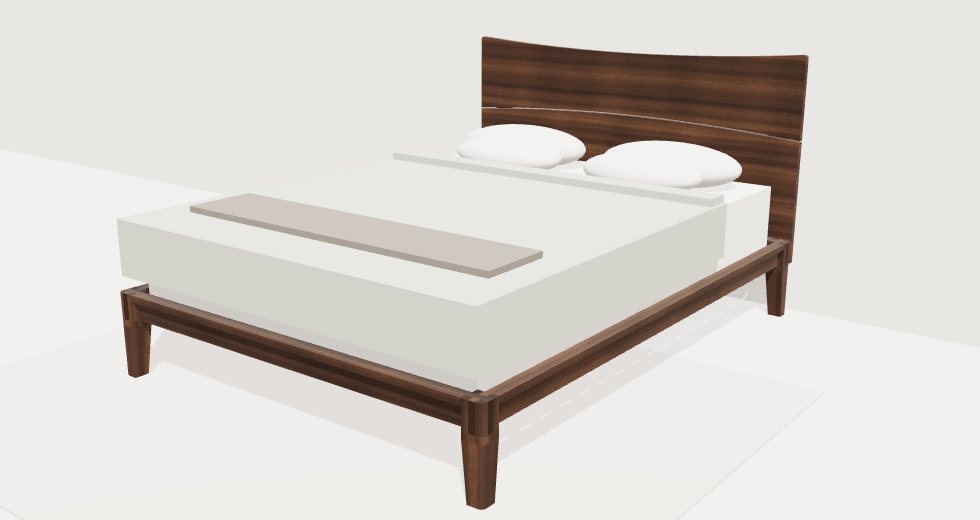
This is a modern platform bed with castle joints at the four corners. Each leg is slotted both ways across the top, the rails half lap each other inside the slots, and gravity holds the whole thing together. No bolts at the corners, and it lifts apart when it is time to move. The headboard is two walnut boards with a quarter inch gap between them that follows a gentle curve.
Seeing it
come apart.
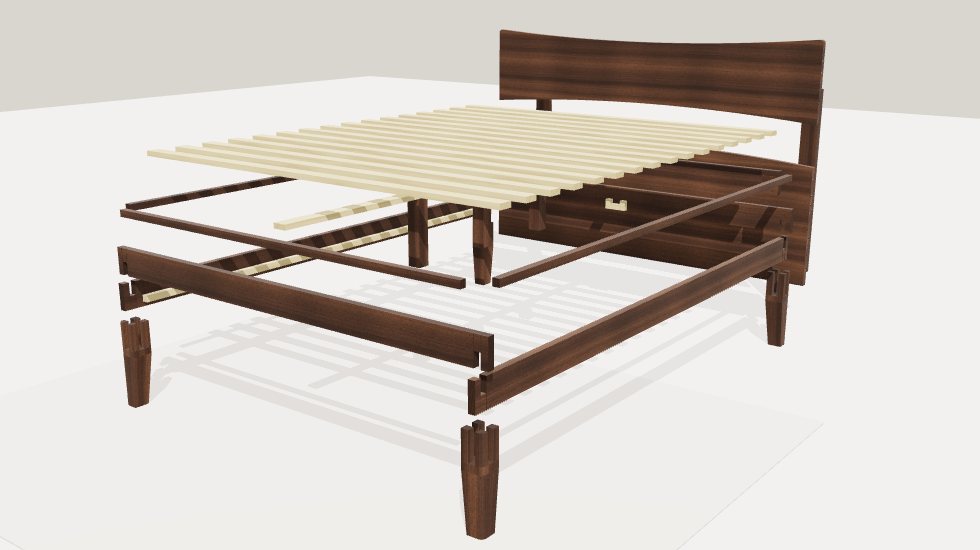
The view I use most is the exploded one. One click and every part lifts away from its neighbours, so I can see how the pieces relate before I cut any of them. This is the thing the notebook could never give me.
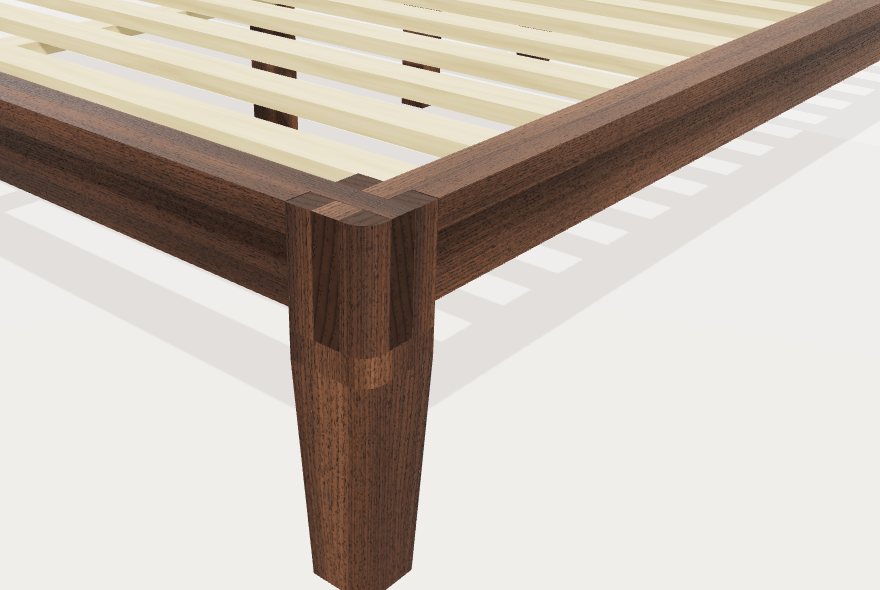
Then I can zoom right into a joint. Here is a corner with the rails seated. You can see the end rail dropping over the side rail inside the leg, and the taper that starts below the joint on the two inside faces.
Everything I need
in the shop.
The model is the fun part, but the paperwork is why I built this. Every plan comes with the same set of pages, all generated from the same model, so they can't disagree with each other.
- Material list
- The lumber to buy by thickness and board feet, with waste included, and the hardware down to the bolt lengths.
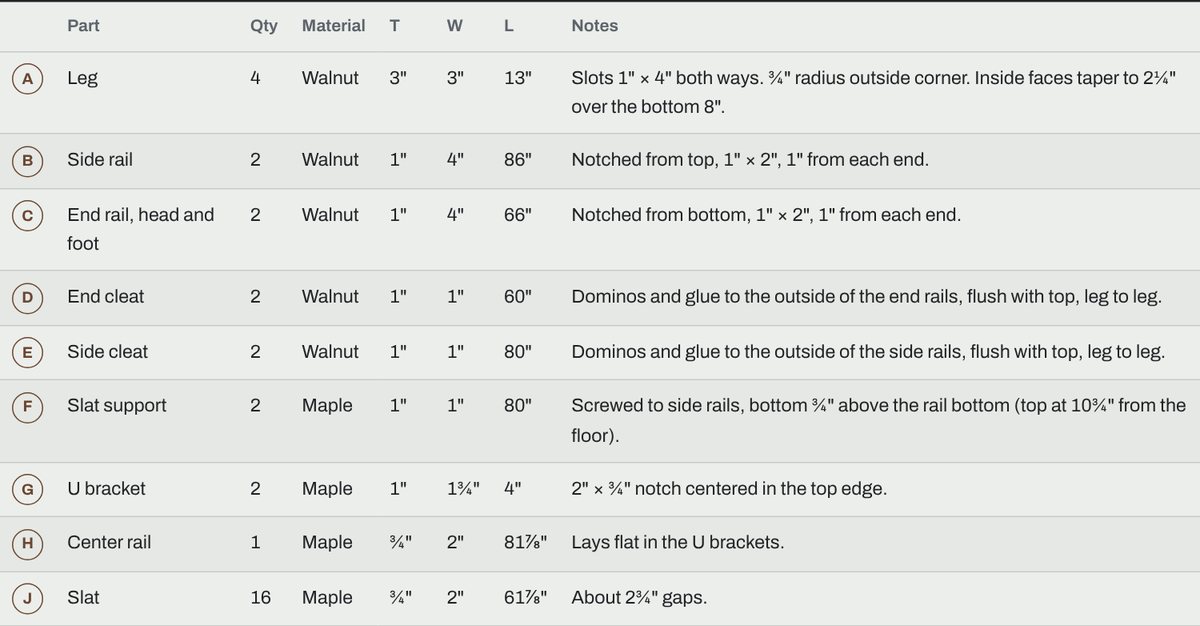
- Cut sheet
- Every part with a letter or number, its quantity, wood and final size, and a note on what gets cut into it.
- Cutting diagrams
- Parts laid out on boards and on 4 × 8 sheets with the saw kerf counted, so I know how many sheets of plywood to buy before I get to the yard.
- Drawings
- Dimensioned part layouts and joinery details, with numbered balloons that match the cut sheet.
- Build steps
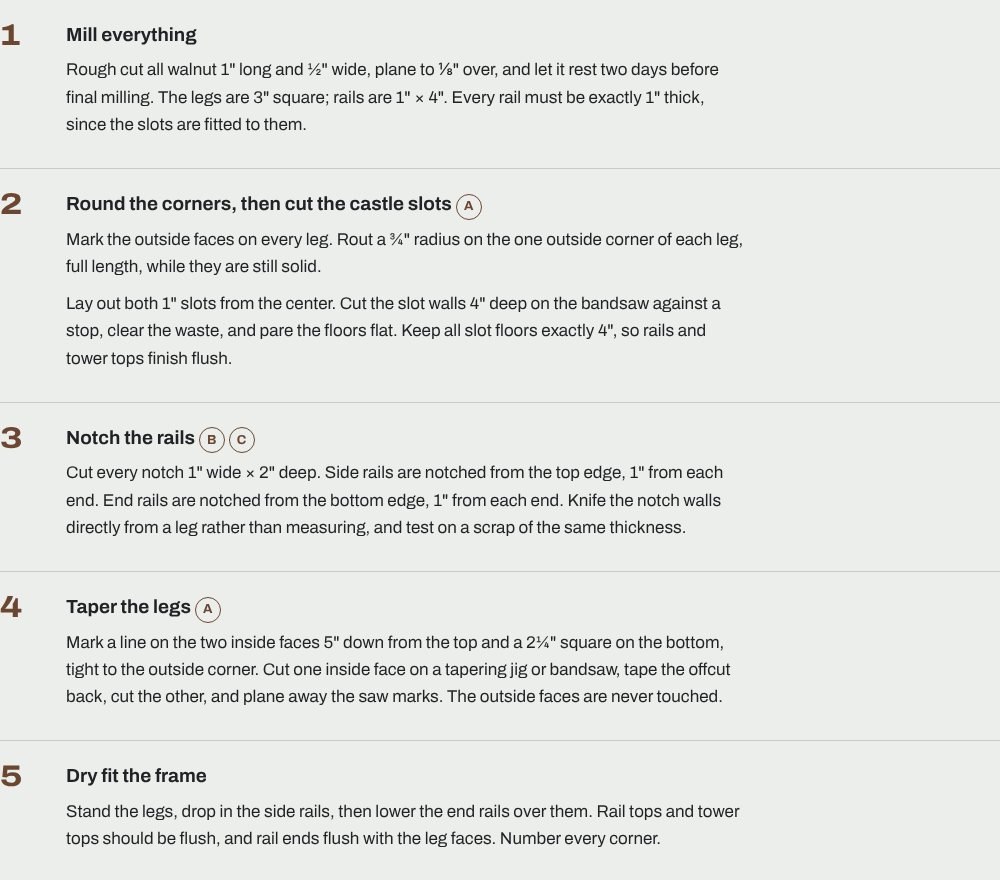
- Numbered, in the order I would actually build it, each naming the parts it adds.
- Printable version
- The same plan as a PDF, so it can live on the bench next to the saw instead of on a laptop.
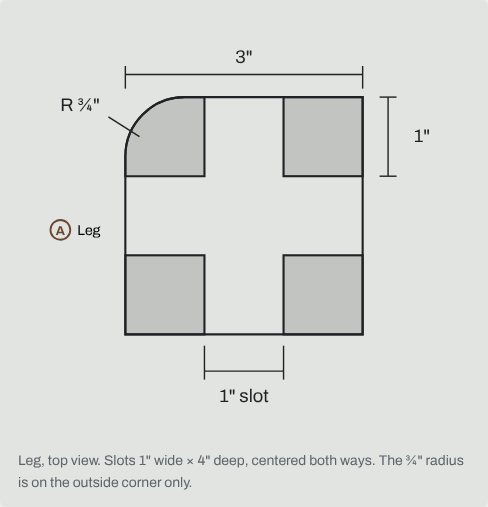
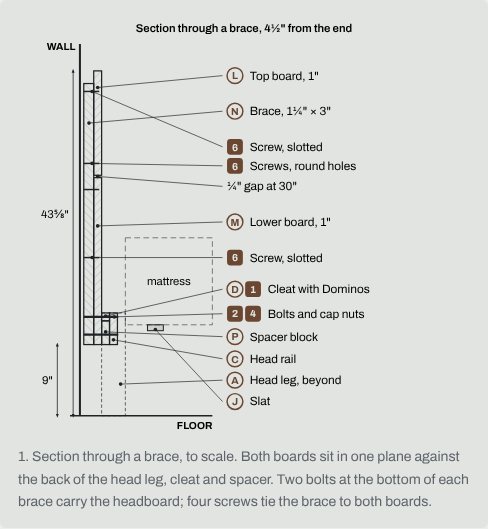
The drawings are the same kind I would see in a magazine plan. Here are two from the bed: the top of a leg, showing the crossing slots and the four towers they leave, and a section through the headboard showing how it hangs on the frame.
What changed the most for me is how fast I can iterate. In the notebook, making a bed two inches wider meant redoing half a page of arithmetic and hoping I caught every number. Now I say "make the rails an inch and a half thick" and get a new revision of the whole plan, with a note telling me what else moved because of it.
How it
works.
The idea underneath is that the model is the plan. Claude doesn't
draw pictures and then type up a cut list to match. It writes a
small parametric file, plan.js,
where every number that matters, like the mattress size, the leg
thickness or the rail height, lives in one block at the top.
Every other dimension is worked out from those. Change the rail
thickness and the slots in the legs, the notches in the rails and
the cut sheet all follow.
Each part is modeled as a plain box placed where it sits in the assembly. The joinery is cut by helper functions, one per joint type: castle joints, mortise and tenon, half laps, bridles, dadoes, grooves and rabbets. When the bed says the side rails sit in castle joints, the helper cuts the slots in the leg, cuts the notches in the rails, and sizes them from a reference of shop rules of thumb, like how thick a tenon should be or how small a tower can get before it snaps off while you cut it. Every bolt, screw and peg is modeled too, down to the hole it needs.
Then a set of scripts checks the model before I ever see it. They prove from the geometry that the cut list matches the model, that no two parts occupy the same space, that every tenon seats and every joint actually touches, and that the whole assembly is connected. They check that each hole can be drilled, stays inside the wood, and that each bolt is long enough to reach its nut. They also check that a cut suits the tool it needs. A dado stack can't cut a slot four inches deep, so the plan has to say bandsaw.
The review earns its keep. On the bed it caught that two different lengths had crept in for the same cleat, and that the center rail, laid flat with one post under it, would sag under two people. The plan now has three posts. On an earlier bed design, the barrel nuts for the headboard bolts landed right inside a corner post, which I would have discovered with a drill bit. That mistake is now written into the review checklist, and the geometry check looks for it on every plan.
Last, a render script opens the finished page in a headless browser, takes screenshots of the 3D view and every drawing, and reports anything broken: overlapping labels, a drawing that didn't render, parts that pass through each other when the view is exploded, a page that scrolls sideways on a phone. Claude looks at those before it hands the plan to me.
Changes work the same way. The old plan gets saved, the new revision gets a letter and a reason, and the review runs again against what changed and everything that touches it. The plan keeps its own history, which is more than my notebook ever did.
“The model is the plan. If the cut list and the drawing disagree, something upstream is wrong, and the check says so before I buy any lumber.”
The takeaway.
I still keep the composition book on the bench. It is good for a quick sketch and for notes while I work. But it is no longer where the plan lives. The plan lives in a model that knows every part, every joint and every bolt, and that gets checked by something more careful than me at nine at night.
The best part is that the time I used to spend at the desk now goes to the shop, which is where I wanted it all along.
Try
Talk through your next project before you draw it.
If you have a stack of half-finished sketches like I did, pick the next project and describe it out loud: the size, the wood, the joints you like. Let the model hold the numbers, and spend your attention on whether the design is right. The skill is on GitHub.